Auto dial
When the setting is enabled, the phone will dial the number on the display when the specified number of seconds has elapsed since the last digit was typed.
Note: The default setting is off. In admin mode, the setting can be enabled on the Advanced Settings page, Behavior tab, Phone Behavior section,
Redialing
- Press
 to show the last numbers dialed, with the very last number at the top.
 - Press
 to dial that number or use
  /
/  to select a different number and then press
Calling number from call history (missed, received, dialed calls)
- Press (dialed calls),
 (received calls), or
  (missed calls) to open the respective call list.
 - Use
 / to select a call.
 - Press to dial the number.
Calling number from external directory
- Open the dial screen to get access to the external directory, if available:
- Lift the handset off the cradle or press the speakerphone key to open the dialing screen (Fig. 1).
- Press the function key underneath
 to show the list of available directories and call lists (Fig. 2).
- Lift the handset off the cradle or press the speakerphone key to open the dialing screen (Fig. 1).
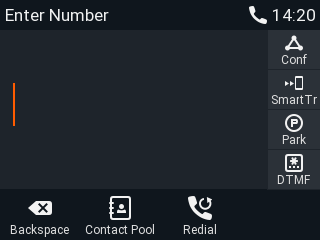
Fig. 1
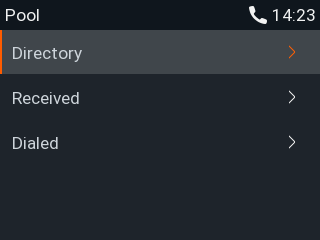
Fig. 2
c. Select the external directory.
2. Use / to select a name or enter the first letter(s) of the name on the alphanumeric keypad.
3. Press to dial the number.
Speed dialing
Setting speed dial numbers: See "Speed dial". Mapping a speed dial number onto one of the freely programmable function keys: See chapter "Configuring the function keys", "Example 2, speed dialing".
- Speed dial number on speed dial list
- Enter the speed dial number (0-30) or character (#, *) assigned to the phone number you wish to dial.
- Press to dial.
- Enter the speed dial number (0-30) or character (#, *) assigned to the phone number you wish to dial.
- Speed dial number mapped onto freely programmable function key 1-32: Select the page, if necessary, and press the key.
Calling emergency numbers
Numbers specified as emergency numbers can be dialed even when the keypad is locked. See "Emergency numbers" on how to set emergency numbers. Several numbers (911, 112, 110, 999) have been preconfigured.
- On an unlocked keyboard: Enter the number and press to dial.
- On a locked keyboard: Enter the number. The phone dials the number as soon as you have entered all the digits of one of the programmed emergency numbers.
Call completion
This function depends on whether it is available in your network or not. On Gigaset phones call completion means that when a called number is busy or not available, you can have your phone call you back as soon as the dialed number is not busy anymore or available again. The factory default
setting is "off".
When call completion is enabled, the symbol
 will appear in the function key line whenever you dial a number (Fig. 1). Press the key underneath to activate call completion for this call.
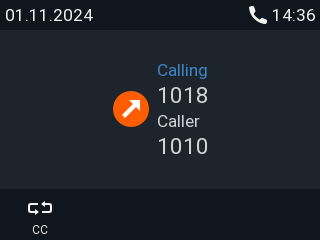
Fig.1
Fig. 2