Valid for:
- N670
- N870
Here we describe how to configure the Gigaset N670/N870/N870E to enable the CrewPTT feature.
We assume that it is installed by an qualified technician who have the knowledge about the Gigaset DECT system.
CrewPTT
Enhancing In-Store Collaboration with a DECT Push-to-Talk Solution
Delivering exceptional customer service and operational efficiency in today’s fast‑paced retail environment demands seamless, real‑time communication. Our DECT CrewPTT solution—comprising rugged handsets, headsets, intuitive software, and expert integration—empowers store teams to connect instantly, work smarter, and enhance safety, all while driving substantial cost savings.
Streamlined Operations and Cost Savings
By enabling associates to communicate hands‑free across the entire sales floor, our CrewPTT system significantly reduces unnecessary foot traffic. Eliminating walking distances/time per colleague each day translates to huge annual savings per store—funds that can be reinvested in customer experience initiatives or staff development. Whether conducting stock checks, responding to self‑checkout alerts, or coordinating price checks, teams stay focused on high‑value tasks rather than logistics.
Accelerated Customer Response
Equipped with one versatile device, staff can talk, listen, and act from anywhere in the store. Voice alerts for low stock, system notifications, or colleague requests are delivered instantly through the headset, empowering associates to assist customers three times faster. From handling till enquiries to advising on product availability, teams maintain a continuous flow of information, ensuring shoppers enjoy prompt, knowledgeable service.
Unified Device for Communication and Training
Our DECT handset/headset is more than a walkie‑talkie—it’s a multi‑functional tool designed for retail. In addition to CrewPTT calls, associates can receive real‑time voice prompts for stock replenishment, price overrides, or safety alerts. New hires benefit from on‑the‑job coaching: trainers can guide remotely, providing step‑by‑step instructions without leaving the sales floor. This “learn‑as‑you‑serve” approach accelerates ramp‑up times and maintains service standards.
Enhanced Security and Team Safety
Integrating seamlessly with existing security systems (AML), the CrewPTT solution delivers immediate, discreet alerts when incidents occur. Rapid coordination reduces theft incidents, while associates report feeling safer—knowing backup is just a button press away. Whether facing a shoplifting event or managing an emergency, store teams can mobilize swiftly, keeping both customers and colleagues secure.
Conclusion
Our DECT CrewPTT solution transforms in‑store communication—driving efficiency, boosting customer satisfaction, and fortifying security. By uniting hardware, software, and integration expertise, we enable retailers to operate leaner, serve customers faster, and create a safer shopping environment. Empower your team with instant, reliable voice connectivity and experience the future of retail collaboration today.
Valid for N670 / N870 / N870E but not supported by N610. Software 2.xx or higher is needed.
1. Feature set
2. Installation and Configuration
Installation of the DECT system
Install the DECT system conform the provided training/documentation/wiki.
Software
Upgrade your DECT system with the software ... or higher.
Upgrade your DECT handsets (if required) with the software ... or higher.
Configure your CrewPTT groups
Open the DECT system web-interface: Go to SETTINGS - CrewPTT
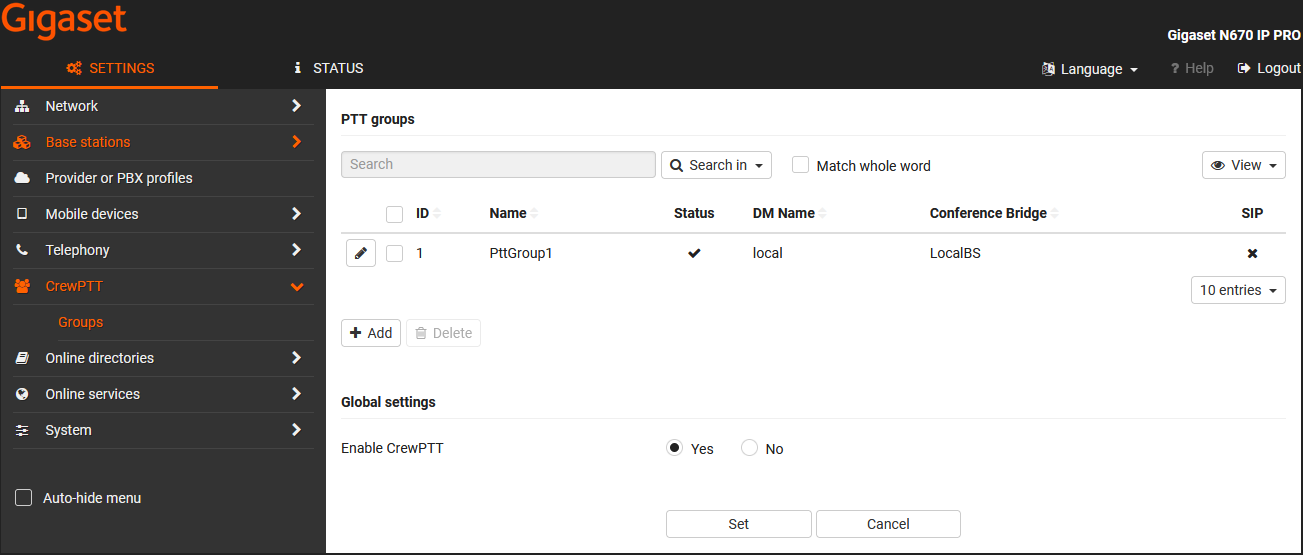
Click on  to edit or
  a new group.
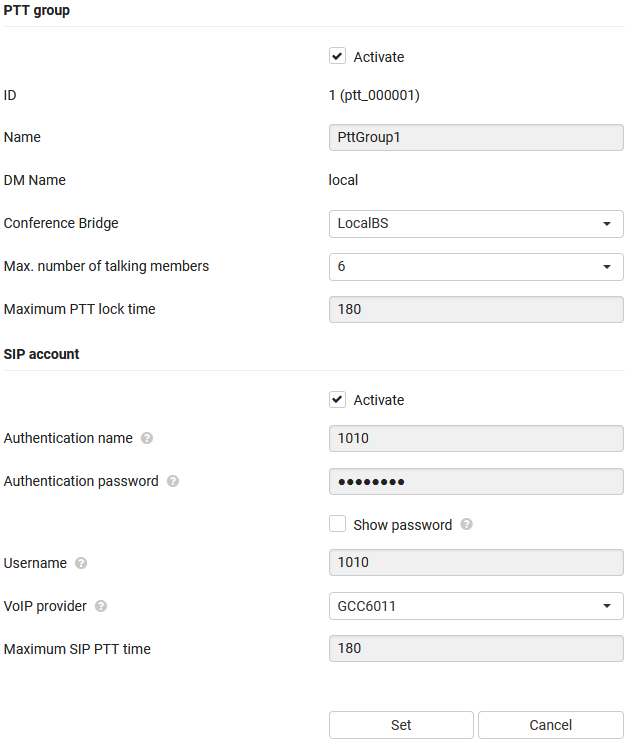
| Parameter | Description |
|---|---|
| PTT group | |
| Activate | Enable/disable the PTT group |
| ID | The internal ID |
| Name | The name of the PTT group |
| DM Name | The name of the DECT manager that hosts the conference bridge for the PTT group |
| Conference Bridge | The DECT base station hat hosts the conference bridge |
| Max. number of talking members | The maximum number of simultaneous DECT calls for this group |
| Maximum PTT lock time | A PTT user can via the handset/headset PTT lock feature talk to group members without holding down the PTT button. To avoid that these users keep the group occupied continuous a maximum timer should be able to configure. When this timer has passed, the user who has the PTT lock activated will be switched to listen mode. |
| SIP account | |
| Authentication name | The PTT group SIP account authentication name |
| Authentication password | The PTT group SIP account authentication password |
| Username | The PTT group SIP account username |
| VoIP provider | The VoIP provider used for this SIP account |
| Maximum SIP PTT time | The SIP call will be automatically ended after the timer |
Resources
CrewPTT groups require resources on the base station.
We have created a tool that can be used to calculate the required resources.
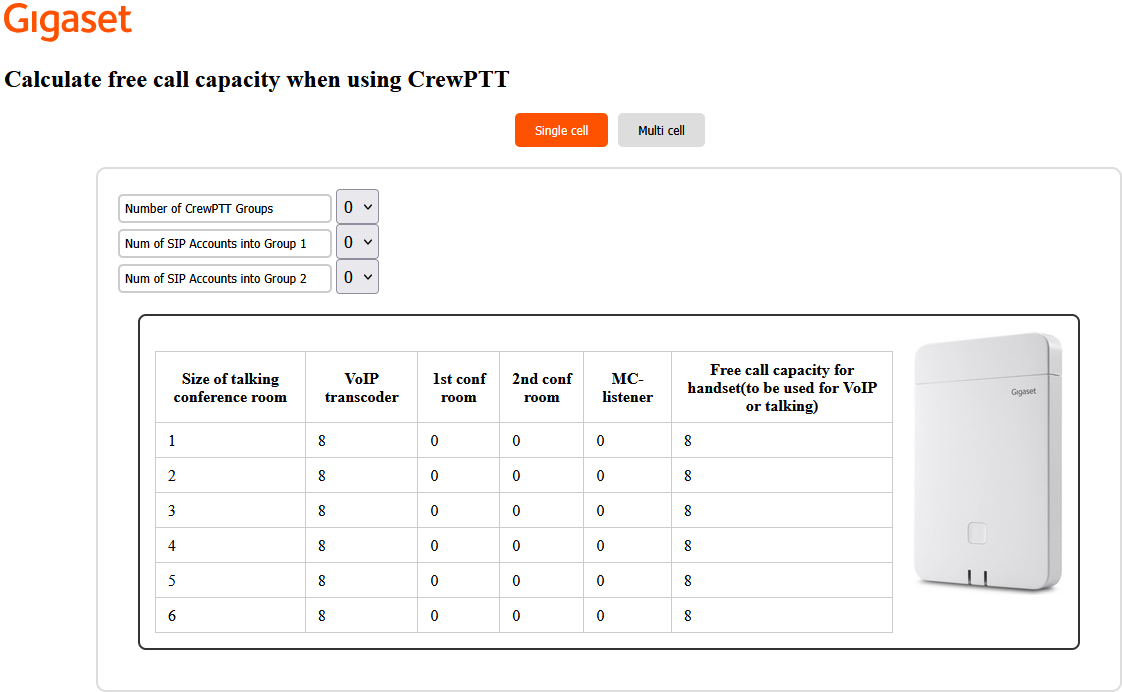
Base stations under the same DECT manager can handle maximum 2 CrewPTT groups.
A Base station must be selected that acts as the conference bridge for a CrewPTT group.
Enabling CrewPTT or using a Base station as conference bridge takes resources, therefore the tool to calculate the free call capacity.