|
We have implemented Software Update Over The Air (SUOTA) with the following options:
- Disabled
- Manual (Default setting)
- Start SUOTA using service window 1
- Start SUOTA using service window 2
SUOTA manual is the default setting where via a manual procedure the SUOTA process can be started.
If the following requirements are met, the handset will show there is new Firmware available.
SUOTA push will trigger the selected handsets to start the SUOTA process in the service window
When a handset is registered new, and the below requirements are set then the handset will ask to be updated.
SOUTA is enabled for all handsets
- A service window to upgrade selected DECT handsets with a new software
This service window allows:- Select a time period where handsets are not used and will not interrupt normal operations
- Up to 2 service windows can be configured
- Up to 2 firmware files can be hosted on our All-in-one system or firmware files can be hosted on an external server
Settings - System - SUOTA
Handset setting: SETTINGS - Mobile devices - Edit -SUOTA 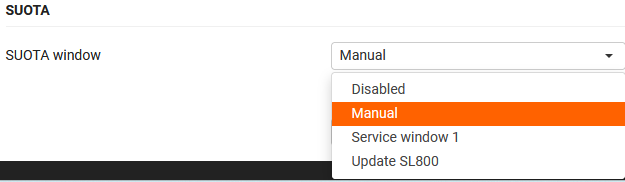 The following settings are available:
|

SUOTA URL's for testing:
With the latest NB, when you upload the file it must be a tar file !!! For devices with one software you can just create a tar file with 7-zip. For R700H protect that has 2 firmware files, you need to create a special tar file. |
- SL800H
- R700H Protect
- protect 136.006.04 : profile.gigaset.net/device/suota/r700_protect/136_006_04/blp_p1_suota__upd.bin
The Protect has 2 software versions, it decides itself if 1 or 2 software needs to be downloaded.
The name of the 2e software (blp_p2_suota__upd.bin) is hard coded in the first software - fake: 136.006.04 (Will show 136.006.05): http://profile.gigaset.net/device/suota/r700_protect/136_006_04/fake/blp_p1_suota_test__upd.bin
- protect 136.006.04 : profile.gigaset.net/device/suota/r700_protect/136_006_04/blp_p1_suota__upd.bin
- R700H/S700H
- R700H
- CH21D
- CH41D
- 145.04: profile.gigaset.net/device/suota/ch41/ch41_145_04.bin
|
