A button has several properties which are described below. It is not necessary that all buttons support all features. For example, it is possible that a phone has LED lights and keys, but no display associated with the button.
Protocol Description
Format
The document contains of CRLF - separated lines. Empty lines indicate the beginning of a new lamp description, so that one document can contain several lamp descriptions. There is no line continuation; a CRLF combination is the clear indication that the line ends. Each line may contain description entries for the lamp. If an entry is not present, then a default value shall apply. The previously stored value for that property will be overwritten in any case. Text is encoded in UTF-8 format. It may not contain special characters like CR, LF or TAB; but it may contain space and UTF-8 encoded characters.
With notepad++
- Encoding convert to UTF-8
- Edit - EOL conversion to Windows (CR LF)
Examples
Sipsak Example
This example shows how you can turn the LED from Function key 1 on (or off)
Phone configuration:
Setup Function key 3 in "Function Keys" as in the following image:

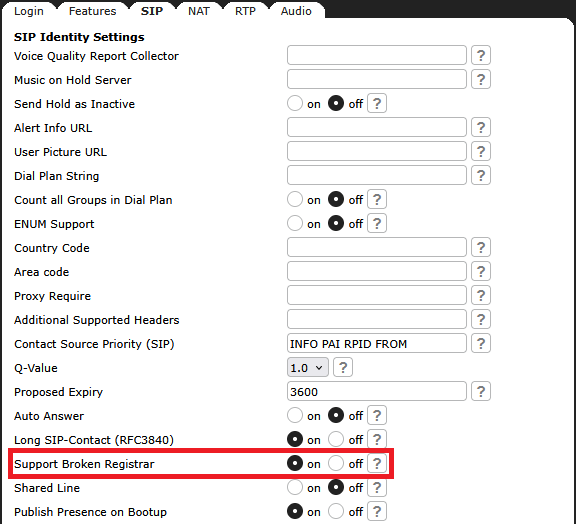
Set in your identity configuration, on SIP tab "Support broken Registrar" to on:
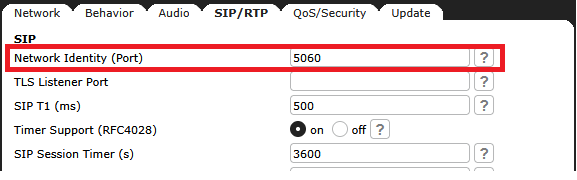
Set in the advanced configuration, on SIP/RTP tab "Network identity (port):" to 5060:
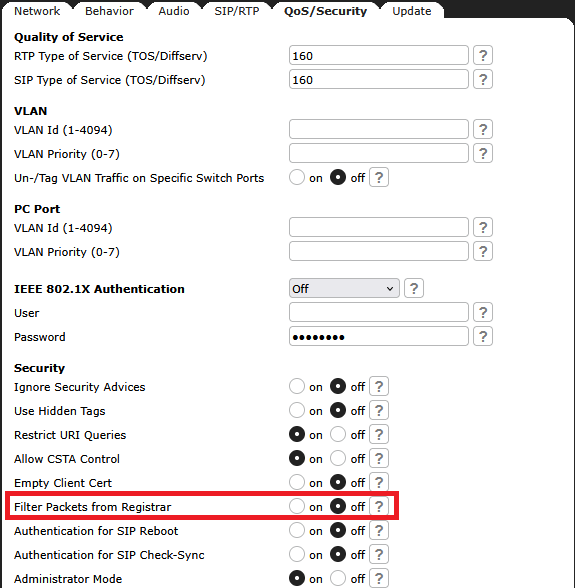
Set in the advanced configuration, on QoS/Security tab " Filter Packets from Registrar:" to off:
Your device needs to be rebooted !!!
In this example the phone have the IP-address 192.168.1.207, the PC where sipsak is installed have the IP-address 192.168.1.192.
Create a file with the name led.txt and the following content:
MESSAGE $user$@$dsthost$;transport=udp SIP/2.0 From: sip:sipsak@$srchost$:1036;tag=38473 To: $user$@$dsthost$ Call-ID: 6algjorv@test CSeq: 59620 MESSAGE Max-Forwards: 70 Contact: < $user$@$dsthost$;transport=udp> Subject: buttons Content-Type: application/x-buttons Content-Length: 32 k=3 c=on o=orange l=Orange LED |
The value "Content-Length:" must be the count of every following character and all CR. |
Now you can use the created file with sipsak to send the notify to the phone:
sipsak -G --hostname 192.168.0.12 -s sip:<identity>@192.168.0.11 --filename led.txt sipsak -G --hostname 192.168.1.207 -s sip:1015@192.168.1.192 --filename led.txt |
Remember to set <identity> to whatever is your identity in your phone, e.g. 1015.